
Introduction #
In this article, we will learn how to view and manage existing database under a Domain in Direct Admin Control Panel. Linux Web Hosting such as Linux Dedicated Server , Linux Reseller Hosting and Small Business Hosting comes with Direct Admin Control Panel. There are many features in Direct Admin Control Panel to configure your domain name with E-Mail, Databases, FTP and DNS.

Prerequisites
#
1.You will require Login details for Direct Admin Control Panel of the Domain name.
Important Notes #
1. Make sure you have a MySQL database under a Domain in Direct Admin Control Panel.
Watch the Video
#
Procedure
#
1. Login to Direct Admin Control Panel by using https://yourdomain.com:2222/ or https://IP-address:2222/ or https://server-hostname:2222/.
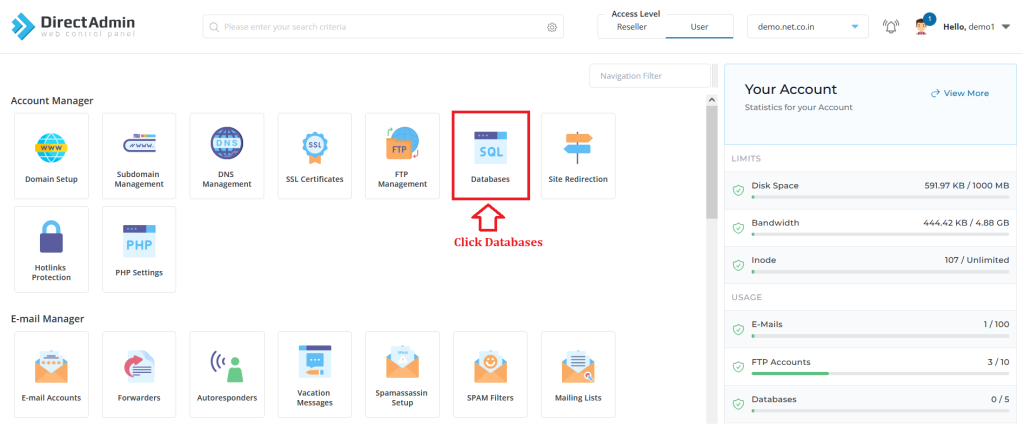
2. In the Account Manager section, click “Databases”.
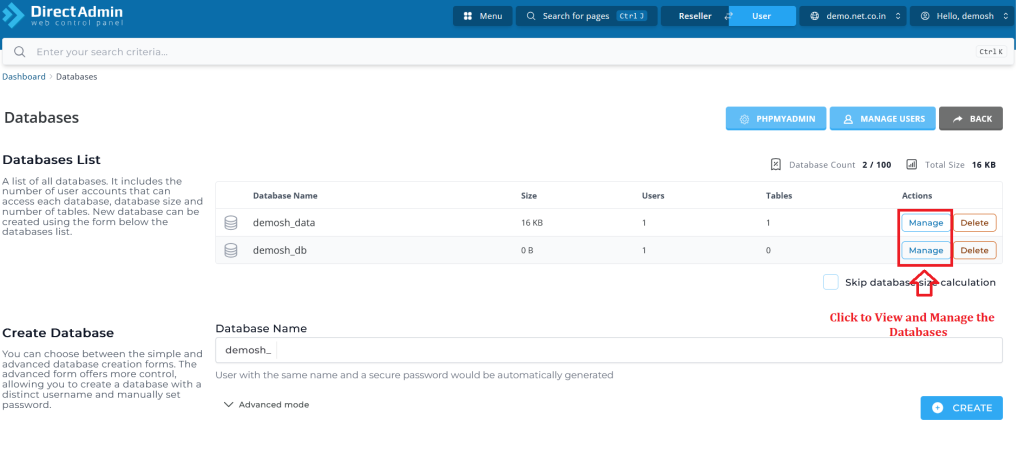
3. In the Databases List, you can view and manage the existing databases .
Conclusion
#
We have successfully learnt to view and manage existing databases in Direct Admin Control Panel. There are many features in Direct Admin Control Panel to configure your domain name with E-Mail, Databases, FTP and DNS. For more details about Java Reseller Hosting Click Here.


